Free · Debian · Ubuntu · Rocky · Alma

The hosting panel cPanel should have been.

Websites, email, DNS, databases, backups and one-click apps — in one fast, modern interface. Every website gets its own isolated PHP — version, modules, settings and CPU/RAM limits — without a CloudLinux licence. Free to download, installs in minutes, and loads with a trusted padlock from the very first minute.

One command to install. Free forever, or 14-day Pro trial · Free forever for VM6 Networks clients

https://srv-a1b2c3.wd-server.co.uk:2087
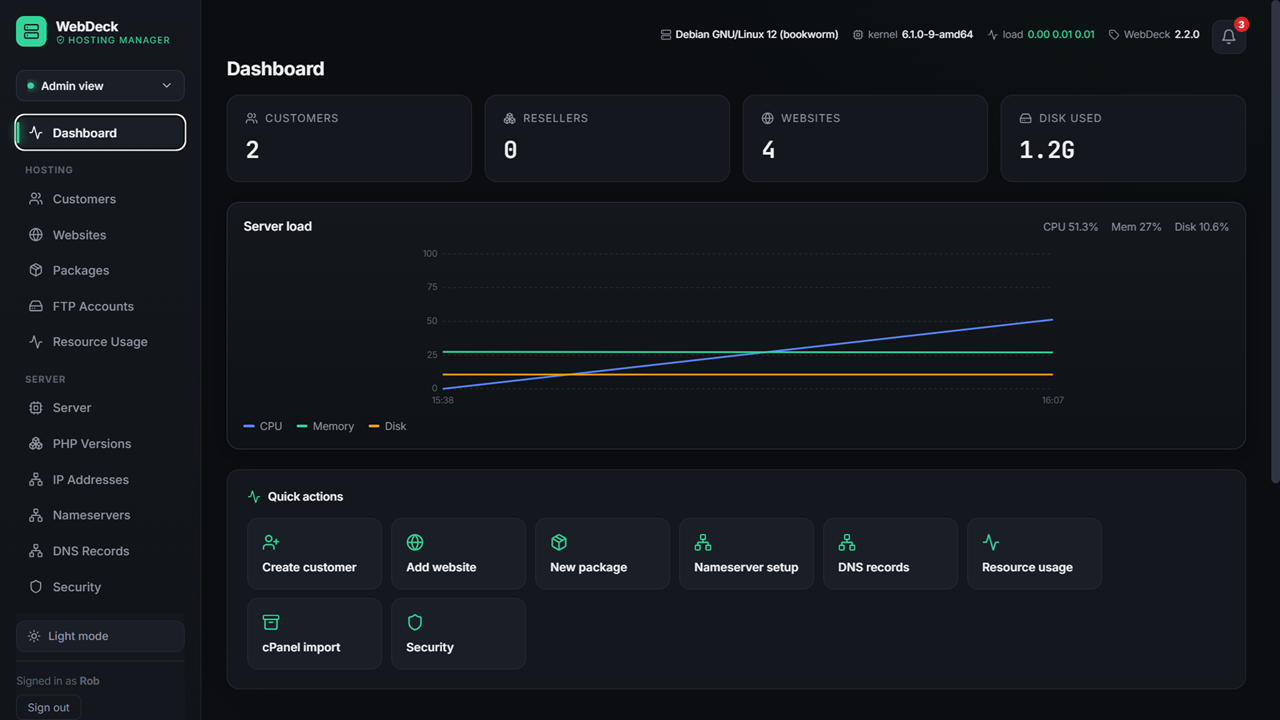
WebDeck admin dashboard showing server health, CPU, memory and disk usage
1PHP environment per website
58one-click apps
3web stacks supported
£0licence & no CloudLinux
Why WebDeck

Everything a host needs. Nothing you have to pay for.

Most panels either cost a fortune per account, or feel like they were built in 2009. WebDeck is neither.

🔒

Trusted HTTPS, minute one

Every install gets a free hostname with a valid certificate — automatically. No "your connection is not private" on a fresh box, ever.

  • Free srv-xxxx hostname
  • Certificate fetched and renewed for you
  • Free Let's Encrypt SSL for customer sites too

It fixes itself

A self-healing reconcile engine rebuilds missing configs, renews certificates and restarts stopped services — before your customers notice.

  • Missing vhosts rebuilt automatically
  • Expiring certificates renewed
  • Stopped services brought back up

Rebuild from nothing

Full disaster recovery. Restore an entire server — sites, databases, mail, DNS and panel config — from a backup onto bare metal.

  • Scheduled local and off-site backups
  • Restore to a brand-new server
  • Customers can restore their own sites

Come straight from cPanel

Point the importer at a cPanel backup and it recreates the account: websites, databases, email, DNS and files. No manual rebuilding.

  • Reads standard cPanel archives
  • Sites, databases, mail and DNS
  • Bulk import for whole servers
👥

Built for resellers

Admin, master reseller, reseller and end user — with quotas, packages, dedicated resource pools and white-label branding that cascades all the way down.

  • Dedicated CPU/RAM pools per plan
  • Overselling protection built in
  • Your brand, logo and colours
  • Resellers never see the server
🧱

A whole PHP environment, per website

The thing hosts buy CloudLinux for — built in, free. Every website runs its own PHP: its version, its modules, its settings, its CPU/RAM/process limits. What one site does can't touch another.

  • Customers toggle their own ionCube, ImageMagick, Redis — no effect on anyone else
  • Per-site PHP version and php.ini settings
  • Kernel-enforced CPU, RAM & process caps per site
  • Confined to their own files · no CloudLinux · SELinux stays on
🔔

Know before your customers do

Email and in-panel alerts for the things that matter — a service down, a backup failing, disk running low — sent to you, and to your customers about their own sites.

  • Notification bell in the panel, on any device
  • Email alerts, with an optional SMTP relay
  • Customers get their own alerts, for their own sites

Fast, modern, actually pleasant

A real interface — not a 2009 admin theme. Dark mode, keyboard-friendly, and it works properly on a phone when you're fixing something at 2am.

  • Light and dark themes
  • Works on mobile
  • Self-updating with rollback
The CloudLinux-grade bit — free

Every website gets its own PHP. Really its own.

On cPanel, giving each customer their own PHP version, extensions and resource limits means buying CloudLinux. WebDeck does it in the box — each website runs a dedicated PHP process it fully controls, isolated from every other site on the server.

🧩

Their modules, their call

A customer can enable ionCube for their shop and disable it next door — on their sites only. Toggling an extension can never break another customer's site, the way a shared PHP install does.

🎚️

Their version & settings

Legacy app on PHP 7.4, new one on 8.3 — per website, not per server. Memory limit, upload size and execution time are set per site too, and apply to that site alone.

🛡️

Their fair share, enforced

Kernel-level CPU, RAM and process caps per website mean one busy or runaway site can't starve the box. No bad-neighbour effect, no overselling — and SELinux stays enforcing throughout.

Why it matters. This is the single biggest reason hosts pay for CloudLinux on top of cPanel. With WebDeck it's included — so a genuine, isolated, per-tenant hosting platform costs you £0 in add-ons.
See it

A panel you won't wince at.

Dark mode by default, light if you prefer, and it works properly on a phone at 2am.

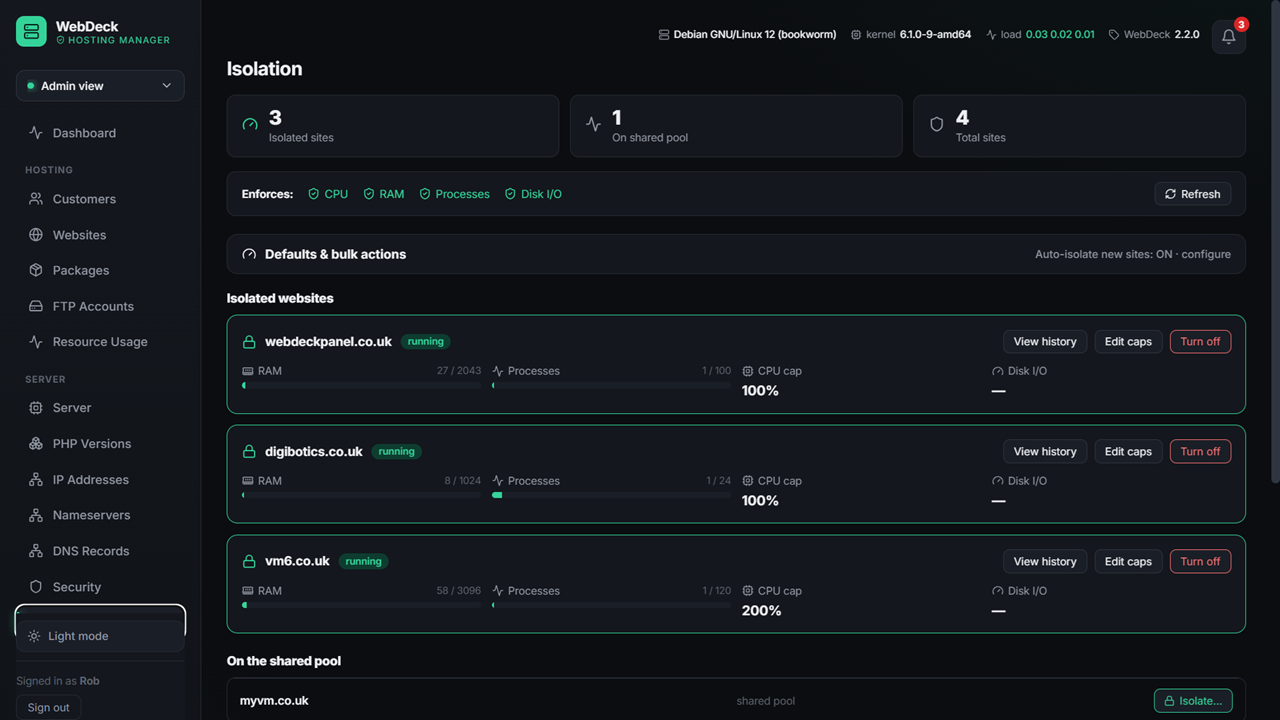
Website Isolation
website isolation webdeck control panel

Website Isolation

Website isolation, so no site suffers from a bad neighbour effect or can bring down the server - without paying for CloudLinux OS.

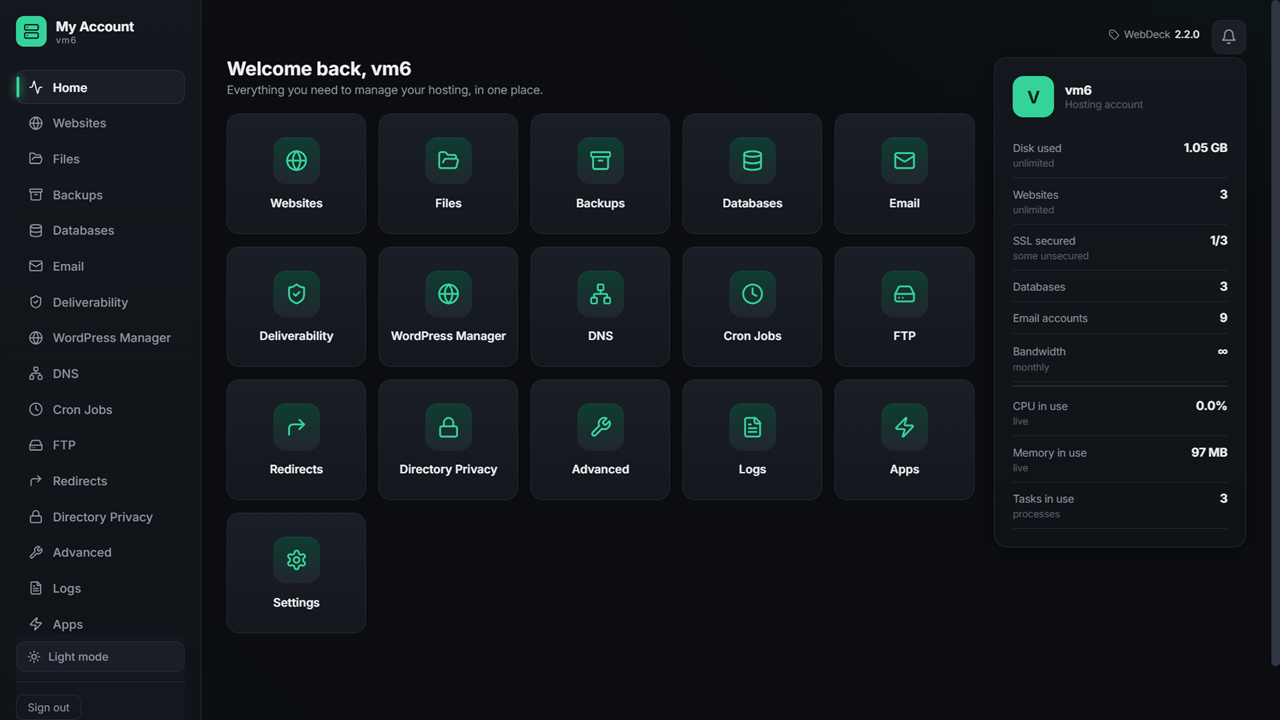
Customer view
WebDeck customer panel showing websites, email, databases and backups

What your customers see

Clean, obvious, and branded as you — not as us. Files, email, databases, backups and one-click apps.

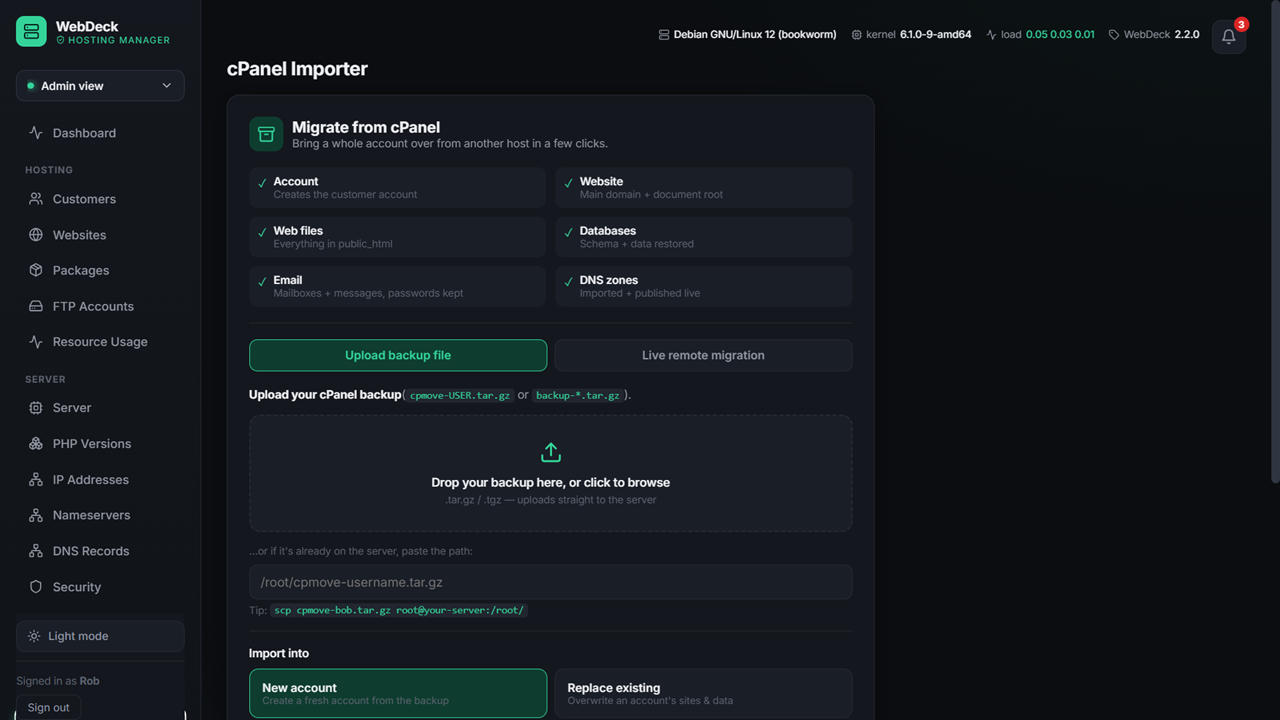
cPanel Importer
Transfer from cPanel - from Backups or use the easy cPanel importer for resellers, users and whole servers!

Easy cPanel Importer

Transfer from cPanel - from Backups or use the easy cPanel importer for resellers, users and whole servers!

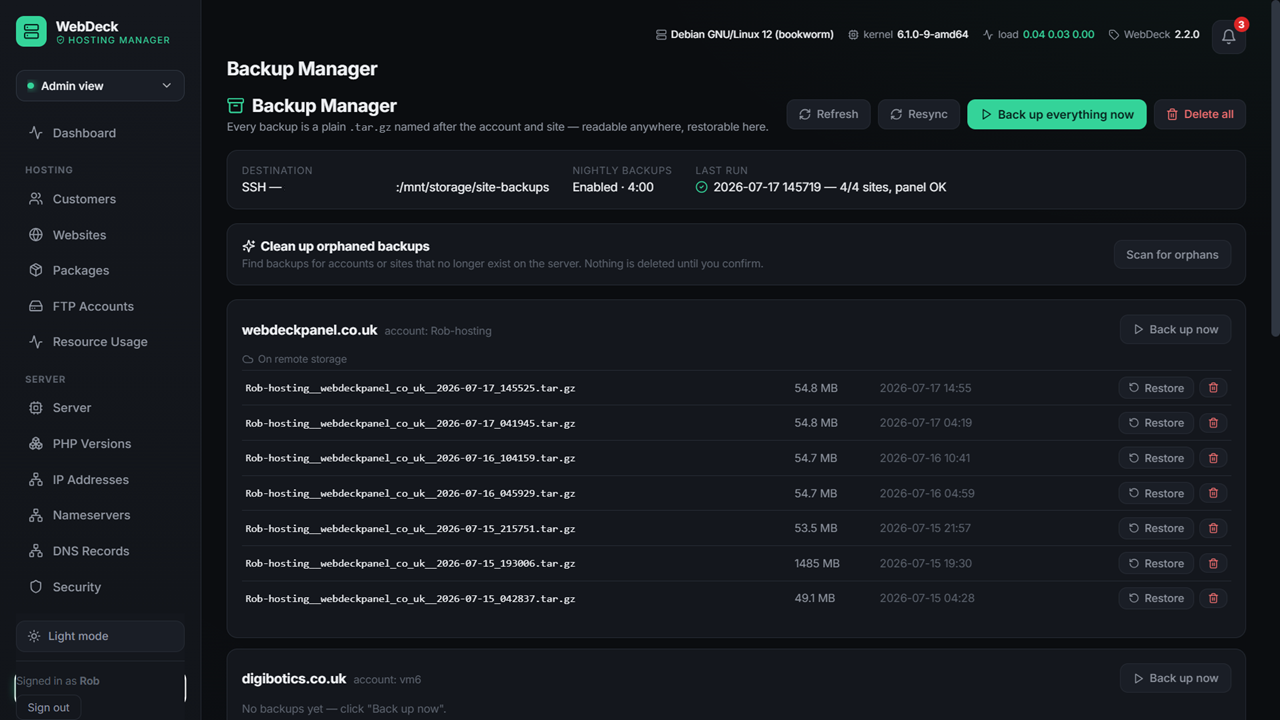
Backup Manager
WebDeck backup manager showing schedules, destinations and restore options

Backups you can actually restore

Scheduled, off-site, deduplicated — with a self-test that proves the backup works, and full-server disaster recovery.

Install

One command. A few minutes. Done.

WebDeck installs the whole stack — web server, database, mail, DNS, PHP, SSL — and hands you a working panel.

# on a fresh Debian, Ubuntu, Rocky or Alma server wget https://www.webdeckpanel.co.uk/downloads/webdeck-installer.tar.gz tar xzf webdeck-installer.tar.gz cd webdeck-installer-pkg && bash install.sh
Then open the address it gives you. A six-step wizard sets up your admin account, nameservers, web server and mail — no config files to edit.
Comparison

How it stacks up

The honest version — including the bits where the others are still ahead.

 WebDeckcPanel/WHMOther free panels
Licence costFreeFrom ~£15/mo, per-accountFree
Per-site PHP version, modules & settingsBuilt inNeeds CloudLinuxRarely
Per-site CPU / RAM / process limitsBuilt inNeeds CloudLinuxNo
Customers change their own PHP extensions safelyYes, isolatedCloudLinux onlyNo
Account isolation (no cross-customer access)Built inNeeds CloudLinux add-onRarely
Trusted HTTPS on a fresh installAutomaticManualManual
Self-healing config repairYesNoRarely
Email + in-panel alertsBoth, built inYesRarely
Full-server disaster recoveryYesYesVaries
cPanel importYesVaries
Reseller hierarchy + white-labelYesYesRarely
Apache, nginx and OpenLiteSpeedAll threeApacheUsually one
Ecosystem & third-party pluginsYoungHugeSmall
Years in productionNew25+Varies
Questions

Straight answers

Is it actually free, or is this a trial-then-pay thing?

Actually free. The Free tier is free forever: 2 hosting accounts and 4 websites, with every feature — isolation, all 58 one-click apps, free SSL, DNS, mail, backups, the WordPress manager. It's a real panel, not a demo.

Pro is £12/month per server — unlimited accounts and websites, plus reseller accounts. Flat fee, no per-account charges however big you get. There's a 14-day free trial, no card needed.

VM6 Networks clients get Pro free, licensed automatically by server IP. Nothing to enter, nothing to renew.

Do I need CloudLinux? What does WebDeck do without it?

No CloudLinux needed. WebDeck gives every website its own PHP environment — its own PHP version, its own extensions, its own php.ini settings and its own kernel-enforced CPU, RAM and process limits. That per-tenant isolation is the main reason hosts add CloudLinux on top of cPanel, and with WebDeck it's built in and free. SELinux stays enforcing — nothing gets disabled to make it work.

Can each customer control their own PHP modules?

Yes. Since 2.2.0, a customer can enable or disable extensions like ionCube, ImageMagick or Redis on their website, change PHP settings, and pick a PHP version — with zero effect on any other site on the server. On a shared PHP install, one customer toggling an extension changes it for everyone; WebDeck gives each site its own PHP master, so that can't happen.

Is WebDeck a proper cPanel alternative?

Yes — it's a full cPanel/WHM replacement: websites, email with DKIM/SPF/DMARC, authoritative DNS, MySQL/MariaDB with phpMyAdmin, backups and disaster recovery, 58 one-click apps, resellers and white-label branding, and a cPanel importer that reads standard cPanel backups. It also does the per-site PHP and resource isolation that cPanel needs CloudLinux for. The honest gaps: it's younger, so the third-party plugin ecosystem is smaller and it hasn't been in production for 25 years.

What happens if my trial ends or I stop paying?

Your websites keep working. Always. Nothing is suspended, disabled or deleted — every site keeps serving and every mailbox keeps receiving. You simply drop to the Free tier limits, so you can't create new accounts or websites until you're back under them or you upgrade. A licence should never take a customer's site offline, and with WebDeck it never does.

What happens to my sites if I stop using it?

Nothing. WebDeck configures standard software — Apache/nginx/OpenLiteSpeed, Postfix, Dovecot, MariaDB, PowerDNS. Your sites, databases and mail keep running exactly as they are. There's no lock-in and nothing proprietary holding your data.

Can I move from cPanel without rebuilding everything?

Yes — the cPanel importer reads standard cPanel backup archives and recreates the account: websites, databases, email accounts, DNS records and files. You can import one account or bulk-import a whole server.

Which Linux does it run on?

Debian, Ubuntu, RHEL, Rocky Linux and AlmaLinux — with Apache, nginx or OpenLiteSpeed, and multiple PHP versions side by side. The installer detects your distribution and does the right thing.

Who's behind it?

WebDeck is built by VM6 Networks Ltd, a UK hosting company (Company No. 16553775). It's the panel we run our own hosting on — which is a fairly strong incentive to keep it working.
Try it on a spare box tonight.

One command, a few minutes, and you'll know whether it's for you. It's free — the only thing it costs is a cup of tea while it installs.